Convert PDF manuals, policies and guides into SCORM courses with AI

PDFs are often the final destination for organisational knowledge: approved policies, operating procedures, technical instructions and compliance requirements. The challenge is that the information employees need is usually buried inside documents designed for reference, not learning.
The challenge is turning it into training without losing the accuracy that makes the document reliable. That’s where PDF to SCORM conversion comes in.
Converting a PDF into a SCORM course makes existing documents easier to understand, complete and track. With JollyDeck, you can transform PDF manuals, policies and guides into editable e-learning courses while keeping critical procedures, terminology and requirements accurate.
In this article, we’ll explain:
- Why a PDF isn’t effective training on its own
- What uploading PDFs to an LMS or creating SCORM courses actually gets you
- How AI can help you turn your PDF into a SCORM e-learning
- Why source fidelity is crucial when converting PDFs to SCORM
- JollyDeck’s approach to PDF to SCORM conversion
- How to convert PDF to SCORM step by step
- Common workplace use cases for PDF to SCORM conversion
Convert PDF documents into SCORM courses with AI
JollyDeck uses AI to transform static PDF documents into structured SCORM courses ready for your LMS — keeping all the information from your source intact.
Create a free JollyDeck account and turn PDF manuals, guides and policies into editable e-learning courses.
Why PDFs don’t make effective training
A PDF is a good way to document a policy or a procedure. It’s rarely a good way to teach one. You open a policy PDF when you need a specific answer to a question such as:
- What’s the escalation threshold?
- How long do we retain this data?
- What’s step four of the incident process?
PDFs are reference documents — long pages of text, dense procedures and static layouts rarely create an effective learning experience. Learners often skim the content, struggle to retain key information and quickly forget what they’ve read.
Your PDF contains the knowledge. Your learners need the training.
Uploading PDFs to an LMS vs creating SCORM courses
Most LMS platforms let you attach a PDF as a downloadable resource. It’s worth knowing exactly what that gets you.
Uploading a PDF to your LMS makes the document available to learners. It doesn’t create an effective learning experience. Learners still read static pages with no guidance, no interaction and no way to check what they’ve actually understood.
If the goal is just to make a document reachable, attaching it works fine. If the goal is a training record you could defend in an audit — proof someone engaged with the material, not just opened it — you need content built and structured for learning.
Why SCORM isn’t the full picture
SCORM (Sharable Content Object Reference Model) is the standard format learning management systems use to deliver and track online training. It lets an LMS record learner activity, including course completion and progress.
Wrapping a PDF inside a SCORM package makes it trackable, but it does not solve the harder challenge: helping learners understand and apply the information inside the document.
For policies, SOPs and technical manuals, effective conversion requires more than making pages available in an LMS. It requires identifying what learners need to know, what must remain unchanged, and where additional explanation or assessment can improve understanding.
Packaging and learning quality are two different problems, and SCORM only solves the first one.
SCORM solves the delivery and tracking problem. It does not decide how information becomes a learning experience. That transformation happens before the SCORM package is created.
| Upload PDF to LMS | Convert PDF to SCORM course |
|---|---|
| Static document | Structured learning experience |
| Passive reading | Interactive learning activities |
| No knowledge checks | Assessments and reinforcement |
| Limited insight into understanding | Learner progress and completion tracking |
| Reference material | Employee training |
How AI transforms your PDF document into a SCORM e-learning
A quality PDF to SCORM conversion needs to solve two challenges:
- Preserve the source document: identifying procedures, terminology, requirements and information that must remain accurate.
- Create a learning experience: organising that knowledge into modules, explanations, activities and assessments that help learners understand and retain it.
This is where AI does the real work. In a PDF, knowledge sits inside long paragraphs, numbered sub-clauses, cross-references and appendices. Turning that into a course means figuring out where one topic ends and the next begins. It means telling a real procedure apart from a footnote. It means spotting a term that needs defining before it’s used three pages later.
This matters especially for compliance, safety and operational training, where changing a single requirement or defined term can change the meaning of the entire course.
A true PDF to SCORM conversion should understand the document, organise its content into logical learning modules, add explanations and knowledge checks where they improve understanding, and preserve the procedures, terminology and wording that must stay accurate.
Source fidelity: what must stay accurate when converting PDFs to SCORM
Not everything should be transformed when converting a PDF to SCORM. For compliance policies, SOPs, safety procedures and technical documentation, accuracy matters as much as engagement.
The goal of PDF to SCORM conversion is not to rewrite authoritative information. The goal is to make it easier to learn while keeping the original requirements intact.
PDF to SCORM conversion should improve how people learn the content—not to rewrite critical information.
This is where AI course generation should be careful, not creative. Source fidelity should be the main conversion principle when turning PDFs into courses — not an afterthought.
PDFs converted into training are usually policies, SOPs, safety procedures or regulatory documents — the kind of source where a single word can carry legal or operational weight. A retention period, an escalation threshold, a defined term in a compliance policy: change any of it, even slightly, and the course can end up teaching something the original document didn’t actually say. AI conversion can quietly reword exactly this kind of detail while still looking polished and ready to review. In most content, that’s a quality issue. In a compliance or safety document, it’s a liability issue.
The source PDF must stay the reference point throughout the conversion: exact wording, values and fixed text should stay untouched where they need to.
JollyDeck’s approach to PDF to SCORM conversion
JollyDeck PDF to SCORM converter uses AI to understand the document, identify the knowledge that matters and organise it into structured e-learning while respecting the source material.
Important procedures, regulatory requirements, diagrams and technical information stay intact, while AI restructures the content into engaging, learner-friendly e-learning.
| PDF content | JollyDeck PDF to SCORM approach |
|---|---|
| Long explanations | Structured into clear learning modules with a logical flow |
| Procedures and processes | Converted into guided, step-by-step learning |
| Policies and regulations | Converted into guided compliance lessons while preserving required wording and obligations |
| Images, diagrams and tables | Preserved as learning visuals where they support understanding |
| Definitions and key concepts | Highlighted and reinforced with explanations and knowledge checks |
You decide how closely the new course follows the original document, balancing source fidelity with an effective learning experience.
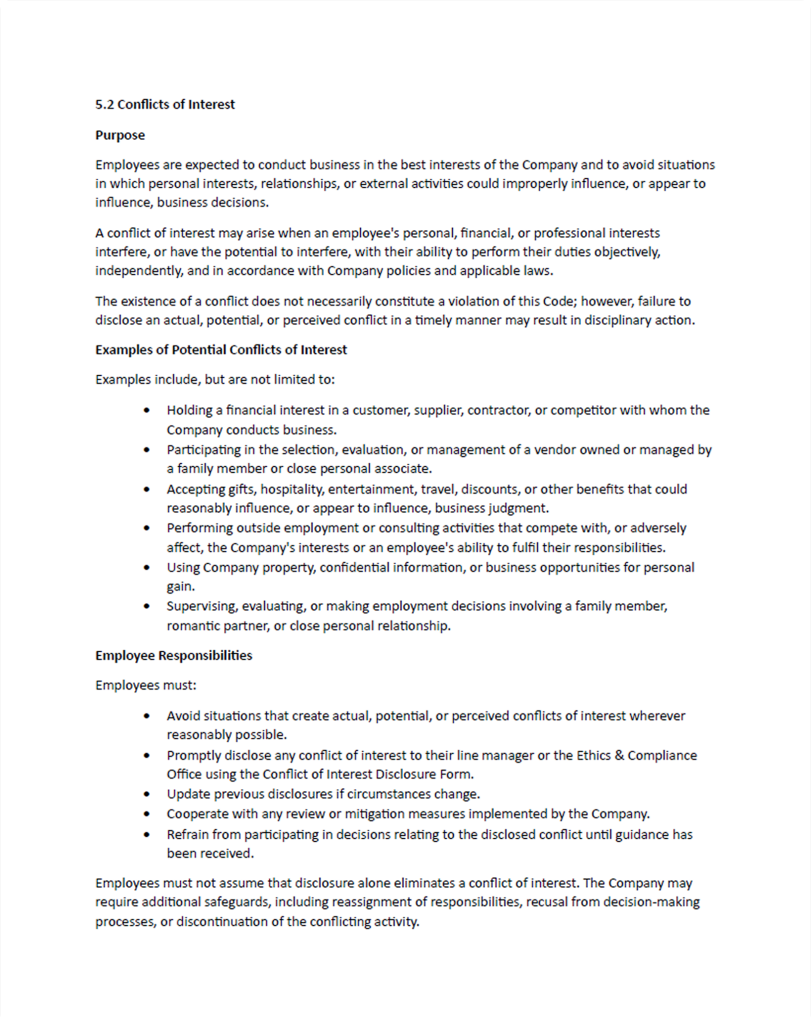
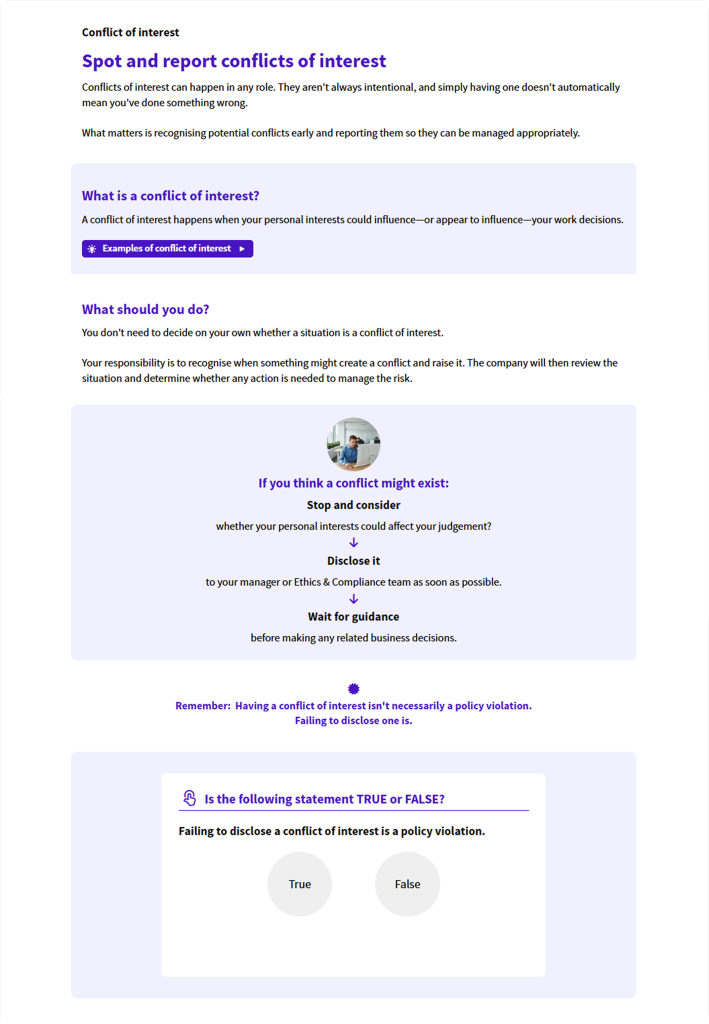
Let’s see what the transformation of PDF content to a JollyDeck course looks like. Here is an example of an actual PDF page from an employee code of conduct handbook, turned into a JollyDeck learning slide:
Before: the code of conduct’s conflicts-of-interest clause, written as dense policy prose with no visual hierarchy or breaks.
After: the same clause restructured into a plain-language definition, three clear steps, a highlighted takeaway and a knowledge check at the end.
How to convert a PDF to SCORM in JollyDeck step by step
JollyDeck runs the process of turning a PDF document into SCORM e-learning together with you. The AI handles the heavy lifting: reading the document, proposing a structure, drafting content, and producing the SCORM package your LMS can use. You handle the parts that need judgment about your own material: what has to stay as-is, what needs more context, how the course should read for your audience.
The process of converting PDF to SCORM in JollyDeck, in six steps:
Step 1: Upload your PDF
Start with the source you already have — a handbook, a safety manual, a compliance policy, a product guide. Upload it to JollyDeck.
JollyDeck analyses the document’s structure, headings, visuals and key concepts to prepare it for course creation.
Step 2: Review the proposed outline
Once JollyDeck understands the document, it proposes a structure. Instead of following the document’s chapters, JollyDeck arranges modules and topics into a learner-friendly course flow.
Review and adjust the outline before generating the course.
Step 3: Define the learning experience
Some documents can be adapted freely. Others — especially compliance policies, safety procedures and regulated documentation — require strict source fidelity. Rewrite settings let you control exactly that.
Choose how AI should convert your PDF into a course. Set the target audience, learning depth, interactions and writing style, while preserving the procedures and compliance requirements that matter.
Step 4: Generate your editable SCORM course
This is where your PDF becomes an editable e-learning course with structured modules, knowledge checks and interactive elements — ready for review and refinement.
Step 5: Review and refine
Nothing about the output is locked. Open the generated course in the Editor, make final changes, and make sure the content is ready for learners before publishing.
This is also a good point to bring in other stakeholders. Share the course for review, collect comments directly on the content, and collaborate on changes before it goes live.
Step 6: Export your SCORM package
Export the finished course as a SCORM package and upload it to your LMS, publish it directly through JollyDeck LMS, or share it by link.
Keeping PDF-based training consistent across teams
Policy and procedure PDFs rarely come from one place. Compliance, HR, safety and quality teams each write their own, often with different templates and different habits around detail. Converting each PDF through the same JollyDeck workflow keeps that variation from carrying into the course itself, and ensuring all courses are exported in a consistent SCORM-ready format.
Furthermore, once generated, the course stays fully editable in JollyDeck. An updated policy clause doesn’t mean starting the conversion over. You can refine wording, add context, or update the course as the source changes, and export a new SCORM package whenever needed.
Hint: If a policy or procedure gets revised often, consider using Dynamic SCORM instead of a standard package. In Dynamic SCORM edits appear to learners instantly, without re-exporting and re-uploading every time the source changes. And keep in mind — SCORM isn’t the only way you can publish and share your JollyDeck courses.
PDF to SCORM for workplace training
Many organisations already rely on PDF documents to share important knowledge. JollyDeck helps transform this existing documentation into structured SCORM courses for a wide range of training needs.
Compliance and regulatory training
Policies and SOPs turned into courses that track completion and keep the wording auditors expect to see.
Safety training
Manuals and procedures rebuilt so learners show they understood the steps, not just that they opened the file.
Product training
Turn technical guides, user manuals and product documentation into something employees, partners or customers will actually work through, not skim.
Onboarding
Turn employee handbooks and internal guides into a structured first-days course, instead of handing new hires a PDF to read on their own.
Many of these use cases run on a mix of source formats, not just PDFs. If PowerPoint decks are also part of your training content, the same AI-assisted approach applies — see how to convert PowerPoint to SCORM.
From static PDF to training that holds up
PDF documents are designed to store and share information, not to teach it. The knowledge inside your PDFs is usually exactly what your learners need — it just needs a format built for learning, not lookup.
Converting PDF to SCORM properly means balancing three things: preserving the accuracy of the source document, creating a learning experience employees can complete, and delivering SCORM training that can be tracked in your LMS.
Convert PDF documents into SCORM courses with AI
JollyDeck uses AI to transform static PDF documents into structured SCORM courses ready for your LMS — keeping all the information from your source intact.
Create a free JollyDeck account and turn PDF manuals, guides and policies into editable e-learning courses.