How to convert PowerPoint to SCORM: Turn PPT & PPTX into LMS-ready e-learning

If you already have training content in PowerPoint, you don’t need to start from scratch to create an online course.
Many organisations rely on PowerPoint presentations for onboarding, compliance, product training and internal knowledge sharing. The challenge is that PowerPoint slides were designed to support a presenter, not to teach learners independently. This is exactly where PowerPoint to e-learning conversion comes in.
JollyDeck helps you convert PowerPoint (PPT and PPTX) presentations into editable SCORM courses for your LMS. Instead of simply packaging slides, the AI works with you to create structured e-learning that learners can complete independently.
In this article, we’ll explain:
- Why PowerPoint falls short as e-learning
- What is PPT to SCORM conversion and how AI course creation tools do it
- The common mistakes in converting PPT to SCORM e-learning
- What is a good PowerPoint to SCORM conversion
- How to create SCORM from PowerPoint step by step (with an example)
- How JollyDeck helps you convert a PPT to SCORM course with AI
- Common use cases of creating SCORM from PPT in organisations
Convert PowerPoint to SCORM for free
Create a free JollyDeck account and convert your PPT or PPTX file into an editable SCORM course ready for your LMS.
Why convert PowerPoint to a SCORM course?
The most common assumption in creating learning content is “We already have a PowerPoint, so we already have a course”.
It feels true because the slides worked perfectly in a live presentation. But much of the learning came from the presenter, not the slides themselves. PowerPoint slides rely on someone to explain bullet points, add context, answer questions and guide learners through the material. Once the presentation is viewed independently in an LMS, much of that context disappears.
A learner opening the same presentation inside an LMS is often left with bullet points, diagrams and headings that don’t provide enough guidance on their own.
PowerPoint slides fall short as learning the moment the presenter leaves the room.
That’s the gap SCORM alone doesn’t close.
SCORM (Sharable Content Object Reference Model) is an e-learning standard that packages online courses for delivery through learning management systems — it lets your LMS launch the course, track learner progress, record completion and capture assessment results.
In other words, SCORM solves distribution and tracking. It gets your course into the LMS and records who completed it. It doesn’t solve whether the course actually teaches anything. A SCORM package built straight from unedited slides will launch and report completion correctly, and still leave the learner with the same disconnected bullet points as the raw PowerPoint file.
Simply wrapping a PowerPoint into a SCORM file doesn’t automatically create an effective learning experience.
What is PowerPoint to SCORM conversion
If you’re looking for a PowerPoint to SCORM converter, it’s worth understanding the difference between simply packaging slides and creating an effective SCORM course.
A successful PPT to SCORM or PPTX to SCORM conversion requires two things:
- Transform presentation slides into a structured e-learning course.
- Export that course as a SCORM package for your LMS.
Many PowerPoint to SCORM converters solve only the second step — the packaging half:
PowerPoint → SCORM package
They create an LMS-compatible file, but they don’t change the learning experience. That’s exactly why AI course creation is an essential part of a real PowerPoint to SCORM converter.
The role of AI in PowerPoint to SCORM conversion
AI helps bridge the gap between a presentation and a complete e-learning course. Instead of treating conversion as a simple file-format change, AI course creation tools transform the knowledge inside the presentation into a course learners can complete independently:
PowerPoint → structured e-learning course → SCORM package
The best solutions for creating SCORM from PowerPoint combine format conversion with AI-powered course creation. Instead of only converting files, they transform PowerPoint presentations into effective e-learning experiences, ready for learners and compatible with any SCORM-supported LMS.
A PPT to SCORM converter alone gives you a SCORM file. Add AI-assisted course creation, and it gives you a SCORM course.
Common mistakes in converting PPT to SCORM
When the deck clearly isn’t enough for learning, most reach for one of a few quick fixes. They feel like solutions, but each leaves the core problem untouched.
Uploading PowerPoint directly into an LMS
A slide deck inside an LMS is still a presentation. It may be accessible and trackable, but it does not automatically become effective training. You’ve solved access, not understanding.
Using a basic PPT to SCORM converter
Many PowerPoint SCORM converters simply package your slides as-is into a SCORM container. This solves LMS compatibility, but not learning. The result may technically work in an LMS, but learners still receive presentation-style slides with limited explanations, no interaction and no structured learning flow.
Adding a quiz at the end
A final quiz does not transform passive content into learning. When and where a question appears matters as much as the question itself. A test tacked on at the end checks attendance, not learning.
Letting an AI tool “generate a course” in one click
This is fast, but it carries a quieter risk: a course that looks polished while subtly losing the meaning, terminology, or detail your slides carried. Keeping the conversion true to the source is arguably more important than speed of conversion.
Every one of these shortcuts changes where the slides live or how they’re packaged, but none of them changes what the content does. Making slides reachable, exportable, or quizzable isn’t the same as making them teach.
Converting PowerPoint to a SCORM course requires transforming the content, not just reformatting or relocating it.
What a good PowerPoint to SCORM conversion includes
Effective e-learning needs more than a PPT or PPTX file provides on its own:
- Contextual explanations, not just summaries. Learners need the why, not only the what.
- Active learning mechanisms. Questions, interactions, and reinforcement points that ask the learner to engage rather than watch.
- A structured learning flow. A logical progression: concept → example → practice → validation.
- Embedded assessment. Knowledge checks placed at the right moment in the journey, not dumped at the finish line.
- Full source capture. Text, slides, images, and speaker notes all feed into the conversion, so the generated content stays faithful to the source while still serving the course’s purpose.
- LMS-ready packaging. A SCORM package that reports completion, scoring, and progress back to your LMS correctly.
Seen side by side, PowerPoint and SCORM e-learning are doing different jobs:
| PowerPoint | SCORM e-learning | |
|---|---|---|
| Built for | A presenter in the room | A learner on their own |
| Flow | Linear, slide 1 → 50 | Structured learning progression |
| Learner’s role | Passive viewing | Active participation |
| Content | Summarised headlines | Explained and contextualised |
| Direction | The presenter guides | The course guides |
| Tracking | None | Completion, scoring, time, pass/fail |
Here’s how to get from one to the other.
How to convert PowerPoint to SCORM
Converting PowerPoint to SCORM isn’t reformatting, and it isn’t wrapping slides in a SCORM shell. Creating effective SCORM course from PowerPoint slides is transformation across four dimensions:
1. Structure
Group and sequence content around a learning logic, not the slide order built for a talk. Separate genuinely teachable content from speaker prompts, decorative slides, and agenda placeholders, then regroup what’s left around topics and learning objectives.
2. Self-sufficiency
PowerPoint decks rely on a presenter to explain each slide’s meaning. Expand short bullet points into learner-focused explanations so the content can stand alone without a presenter in the room.
3. Flow
Guide the learner toward understanding with the right emphasis on what matters most. Sequence topics so understanding builds gradually, place explanations where a concept needs to land, and build in questions and checkpoints that reinforce it.
4. SCORM package
Only once structure, self-sufficiency and flow are in place does SCORM packaging matter. Review the content, make final adjustments, then export as a SCORM package for your LMS.
A successful PPT to SCORM conversion requires transforming presentation content into a structured learning experience before creating the final SCORM package.
PowerPoint to SCORM e-learning: a before-and-after example
Theory is easy to nod along to, so here’s what the transformation actually looks like.
Before: A PowerPoint slide with a title and five bullets
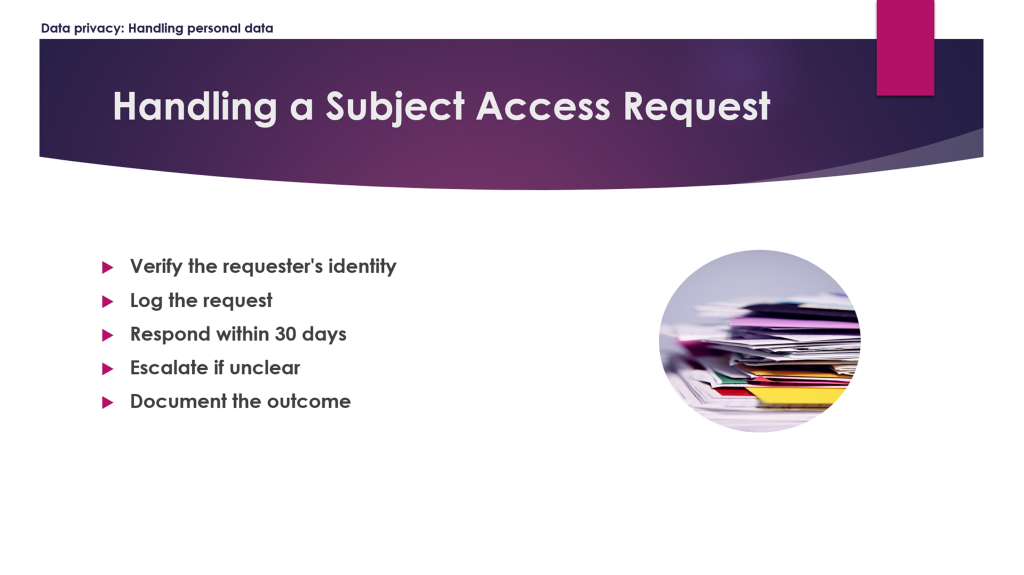
To the person who presented it, every line is a cue for a paragraph of explanation. To a new hire reading it alone, it’s a checklist with no meaning behind it. Verify identity — how? Escalate to whom? What happens if the 30 days slip? The slide names the steps but explains none of them.
After: Same content as a SCORM-ready course slide
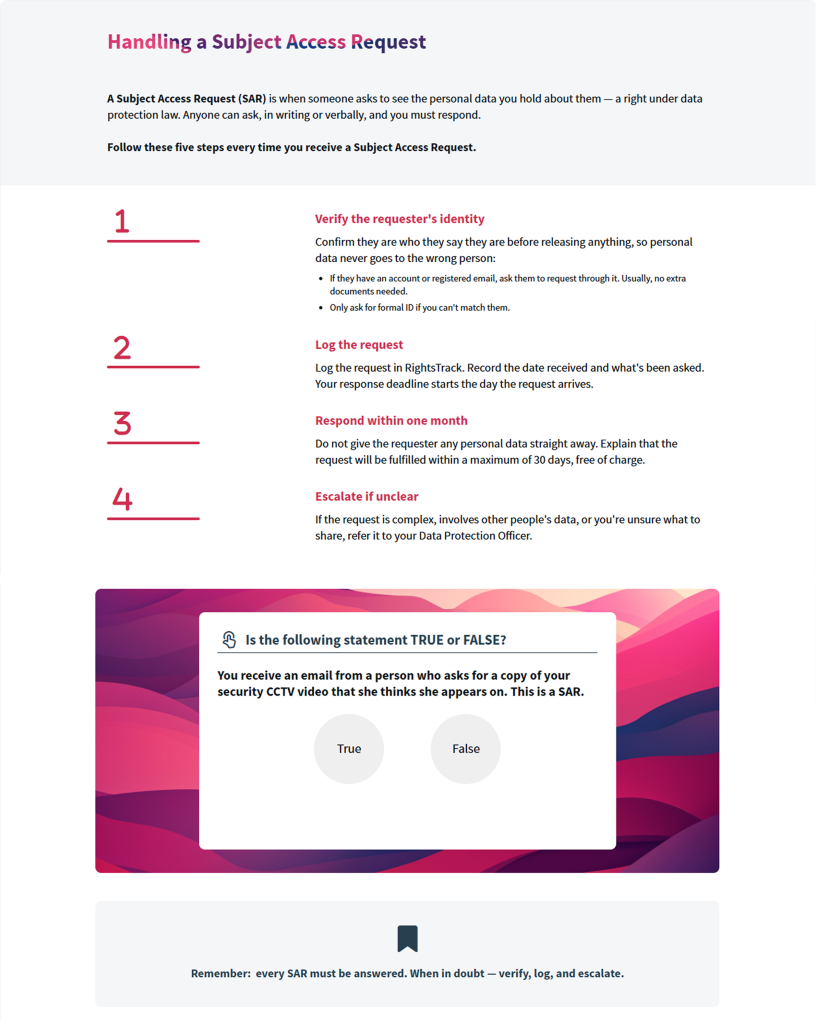
Each bullet becomes a short explanation that carries the reasoning: how to verify the requester’s identity, where to log the request, when the 30-day clock actually starts. The steps are grouped into a logical flow instead of a flat list. And the interactive question appears exactly where it reinforces the lesson.
The value of a true slide-to-course transformation is visible in the difference: context is restored, the learner has something to do, the content stands on its own, and it’s LMS-ready.
See more examples of real conversions of PowerPoint to courses.
Create SCORM from PowerPoint with JollyDeck
JollyDeck Doc-to-Course is an AI-powered workflow that converts PowerPoint decks into structured, editable e-learning courses and export them as SCORM packages ready for your LMS.
Doc-to-Course follows the same principles outlined above, but the AI does the heavy lifting: analysing your slides, proposing a structure, drafting the content, and exporting the result as a SCORM package your LMS can read. Your role is to guide it and make the calls that need human judgement or internal know-how — what to emphasise, what to keep exact, how the course should read.
To convert PowerPoint to SCORM in JollyDeck:
- Upload your PPT or PPTX file.
- Work on the outline
- Adjust rewrite and interactivity settings
- Generate the course
- Review the course
- Export as a SCORM package
Here’s how that works in practice.
Step 1: Upload your PowerPoint presentation
Start with the training deck your team already uses. Upload your PPT or PPTX file to JollyDeck.
Before it builds anything, JollyDeck reads the whole PowerPoint deck: the text on every slide, the visuals and the speaker notes. The goal is to identify the knowledge, concepts, and instructions that should become part of the course.
Step 2: Review the course outline
After the AI understands what the PowerPoint actually contains, JollyDeck proposes a structure — a learner-focused outline with modules, topics and a logical progression.
You can review the proposed outline and adjust it to match your learning objectives. The outline keeps everything important from your slides, and still says what your source meant. This means, you’re refining a structure that’s faithful to your material, not rebuilding from a distorted draft.
Step 3: Choose how your PowerPoint becomes e-learning
Every presentation is different. Some training materials only need light editing, while others require additional explanation and context. By giving you control over rewrite settings, JollyDeck lets you decide how closely the course should follow your original PowerPoint slides.
Step 4: Generate an editable e-learning course
JollyDeck transforms static PowerPoint slides into an interactive e-learning course.
Important visuals, diagrams and source information are preserved, while presentation-style content is restructured into a learning experience that learners can complete independently. Knowledge checks and interactive elements are introduced where they reinforce understanding.
Step 5: Review and refine
The generated course remains fully editable.
Review the content in the Editor, refine explanations, update wording and make any final changes before publishing.
Step 6: Export your SCORM package
When your course is ready, export it as a SCORM package and upload it to your LMS.
Alternatively, you can publish the new course directly in JollyDeck LMS or share it with your learners via link. Read more about different ways to publish JollyDeck courses.
Why choose JollyDeck instead of a traditional PowerPoint to SCORM converter?
As covered above, a traditional converter solves the packaging half only — the presentation remains largely unchanged, and learners still work through slides built for a presenter rather than independent learning.
JollyDeck takes a different approach, using AI to analyse your content and transform it into an editable e-learning course before exporting it as SCORM.
Here’s that difference side by side:
| Traditional PowePoint to SCORM converter | JollyDeck |
|---|---|
| Wraps slides in a SCORM package | Transforms PowerPoint into a structured e-learning course |
| Preserves presentation flow | Creates a learner-focused learning journey |
| Minimal interaction | Adds knowledge checks and learning activities |
| Limited editing after conversion | Fully editable before and after export |
| Technical conversion | Learning transformation plus SCORM export |
The difference is simple:
A traditional converter creates a SCORM file. JollyDeck helps create a SCORM course.
Consistent, editable courses in a Dynamic SCORM
Organisations often have hundreds of presentations created by different teams and subject matter experts. A consistent PowerPoint to SCORM workflow in JollyDeck helps ensure every course follows the same conversion principles and is exported in a consistent SCORM-ready format.
Furthermore, once generated, the course stays fully editable in JollyDeck. You can refine wording, add context, or update it as the source changes, and export a new SCORM package whenever needed.
Hint: If you expect to keep updating the course after publishing, consider using Dynamic SCORM instead of a standard package. This way, your edits will appear to learners instantly, without re-exporting and re-uploading every time something changes.
PowerPoint to SCORM: common use cases
PowerPoint remains one of the most common formats for creating internal training. Reusing existing PowerPoint presentations dramatically reduces the time required to create online learning.
For many organisations, the goal isn’t simply to create SCORM from PowerPoint. It’s to turn presentation knowledge into effective online learning that can continue to evolve over time.
Here’s where PowerPoint to SCORM conversion proves to be most useful in organizations:
- Employee onboarding: Turn onboarding presentations into engaging SCORM courses with a clear learning path, interactive activities and handy, so new hires get a self-paced learning journey instead of a slide deck to read through alone.
- Compliance and policy training: Turn live compliance training presentations into trackable e-learning courses while keeping important procedures, requirements, and key information intact — critical when the exact wording of a policy can’t be casually rephrased.
- Product training: Transform product presentation slides into structured learning experiences that help employees, customers, or partners actually understand your products, not just skim through them.
- Sales enablement: Convert sales decks into reusable job aids with a clearer structure, a more scannable format, and easier access. It’s about creating content that’s designed to be revisited and retained, not just presented once.
PowerPoint isn’t the enemy — it just needs to become a SCORM course
PowerPoint slides are a good way to support a presentation. The knowledge inside them is often exactly what your learners need. The problem is the format: a PowerPoint was never built to teach on its own, and it was never built to be SCORM.
Converting PowerPoint to SCORM properly means transforming that content — restructuring it, making it self-sufficient, giving it a real learning flow — before packaging it as a SCORM file your LMS can track. That’s the difference between a PPT to SCORM converter that just wraps your slides, and an AI course creation tool that helps you create SCORM course from PowerPoint you can actually stand behind.
Generation then runs automatically; you don’t need to stay on the page, and you’ll get an email when the course is ready. The finished course remains fully editable in the Content Editor.
Convert PowerPoint to SCORM for free
Create a free JollyDeck account and convert your PPT or PPTX file into an editable SCORM course ready for your LMS.