How do I publish or export a course with narration?
You can publish courses with AI-generated audio narration in JollyDeck or export them as SCORM packages. Narration availability depends on your chosen publishing method and account plan.
Step 1: Generate AI narration
Before publishing, generate narration for your course:
- Open your course in the Content Editor.
- Click the headphones icon in the top toolbar.
- Click Generate audio.
Once generated, you can preview the narration, adjust pronunciation settings and choose which images or questions to include.
For detailed instructions, see How to generate audio narration in JollyDeck (and fine-tune it).
Step 2: Publish your course with narration
Once narration is generated, you can publish your course using any of the following methods:
- Private link, JollyDeck LMS, Live SCORM or public link:
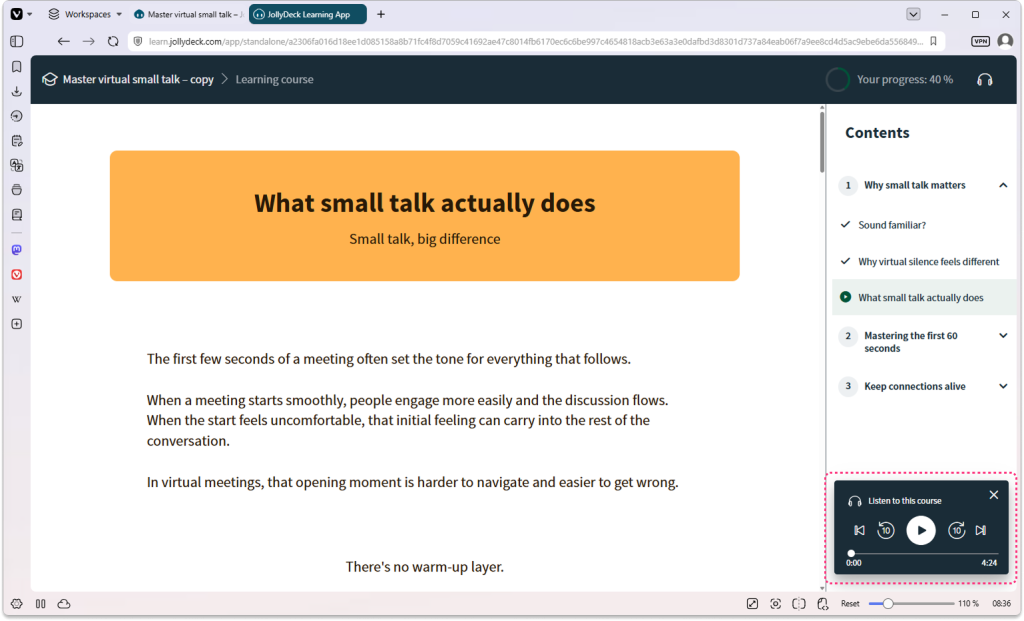
Narration is automatically available when learners open the course, through the audio player in the bottom-right corner.
- Standalone SCORM:
Narration is available by default to Enterprise clients only.
Need narration in a standalone SCORM package?
If you’re not on an Enterprise plan but need to export a course with narration as a standalone SCORM package, contact us at support@jollydeck.com. We’ll help you find the best option for your needs.
Related resources:
Related resources: