Take your learning content with you: Export courses as Markdown

A course is more than a set of slides. It contains knowledge your organisation may want to reuse in different ways over time. But when content lives inside an authoring tool, reusing it elsewhere is not always straightforward.
That is why we’ve added Markdown (MD) export to JollyDeck. Your course content is now available in a clean, structured format that you can edit, reuse, and move into other tools and workflows.
In this article:
- Why your course content is worth reusing
- Why export learning content as Markdown
- How Markdown fits into AI workflows
- How to export a JollyDeck course as Markdown
From an SOP to reusable organisational knowledge
Most courses begin as existing organisational knowledge: an SOP, policy, manual, or expert document. By the time that material has been restructured into learning, enriched with explanations and examples, and reviewed by stakeholders, the organisation has created something more valuable than the original source.
Markdown export makes that final, reviewed version reusable. Use it to seed a knowledge base, create future learning resources, index content in retrieval systems, ground your own models, or make approved knowledge available to AI assistants through MCP.
This extends the return on the entire course-development and approval process, rather than allowing its value to end inside the LMS.
Why export your content as Markdown?
Markdown is a clean, structured, text-based version of your course content. No formatting layers, no platform-specific packaging. Just the content itself, in a format that is easy to read, edit, move, and reuse. is a clean, structured, text-based version of your course content. No formatting layers, no platform-specific packaging. Just the content itself, in a format that is easy to read, edit, move, and reuse.
The idea behind Markdown export is simple: make your learning content easier to move between different tools, teams, or workflows.
Reuse content for what comes next
This is the most practical benefit, and probably the one you’ll use the most.
A course you create today may have a different purpose tomorrow. You might want to:
- Turn course content into documentation
- Reuse its content in another authoring tool
- Create a job aid or reference resource
- Use the content as the starting point for another course
- Feed content into an AI workflow
Instead of copying content slide by slide, you can export it as a single Markdown file and work with it wherever you need it next.
A format that works well with AI workflows
Learning teams are increasingly using AI not only to create courses, but also to review, adapt, restructure, and repurpose existing content. For these workflows, having clean, structured text is useful.
Markdown is a lightweight format that both people and many modern tools can work with.
An exported MD file can become another input into your content workflow. Use it as the basis for a new resource, make broader changes with an AI tool, or prepare the content for another publishing workflow.
You remain in control of the content while gaining more flexibility in how you use it.
Keep a usable version of your learning content
There is also a simpler reason to export your courses. Your organisation’s learning content has value beyond the platform where it was created.
An LMS, a SCORM package, or an authoring project carries a lot of technical and presentation information alongside the actual learning content. A Markdown export strips that away, leaving the instructional content itself, structured and readable.
Having a clean, text-based version makes it easier to archive, review, and keep a record of the knowledge contained in a course. And because Markdown can be opened without specialised authoring software, that content remains accessible over time.
Where to find Markdown export in JollyDeck
Markdown export is available on all JollyDeck plans.
Export your course
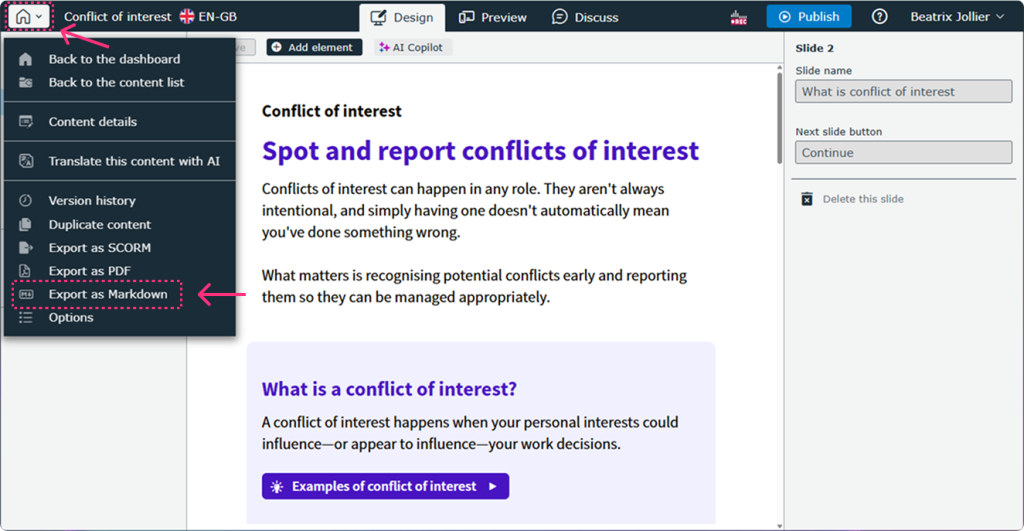
To export a course as Markdown:
- Open your course in the Editor.
- Click the house icon on the left side of the top toolbar
- From the menu, select Export as Markdown.
- Your MD file will download automatically.
What gets exported?
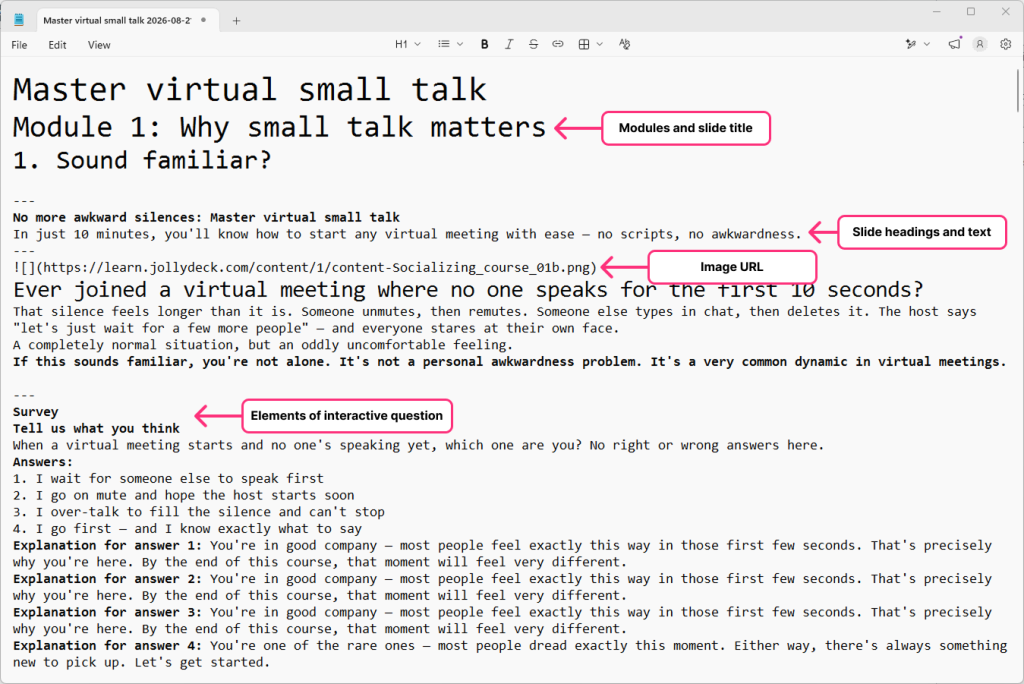
The Markdown file contains the textual and structural content of your course, including:
- Modules and slide titles
- Headings and paragraphs
- Text from interactive elements, including titles, instructions, questions, answers, explanations, and captions
- Definitions of interactive elements, e.g. Image map, Hotspot
- Links and URLs
- Scripts from AI videos built in JollyDeck
- URLs for YouTube and other embedded videos
- URLs to images
What doesn’t get exported?
Markdown export is a content export, not a visual replica of your course. It does not include images themselves, visual layouts, interactive functionality, videos, narration, animations, or other visual elements.
One thing worth being clear about
It is important to be clear about what Markdown export is, and what it isn’t.
Markdown export isn’t a way to preserve your course exactly as designed. It captures the textual and structural learning content, not the visual layout, interactions, or animations. As such, it gives you a clean, structured version of the learning content that you can read, edit, archive, or reuse in other tools and workflows.
Markdown is not proprietary. It’s lightweight, human-readable, and supported by more tools than we could list here.
That’s not a downside, it’s the point.
It comes down to one thing: with MD export, your content remains readable, usable, and ready to go wherever your workflow takes you next.
Try it yourself
Create a course in JollyDeck and export it as Markdown. Reuse your learning content wherever your next workflow takes you.