
JollyDeck has been pioneering the conversion of documents into courses for years. With our new Doc-to-Course converter, we are taking this idea much further.
Most training content starts as a PDF, a Word document, a PowerPoint deck, a policy, a manual, a procedure, or a technical document. The new converter is built to turn these static documents into structured, editable learning experiences.
It supports PDFs, Word documents, and PowerPoint files, and helps transform them into courses that can be reviewed, adjusted, enriched with questions, and edited in JollyDeck Create.
Main benefits:
- Convert any resource into an interactive course
- Control how the course is written
- Turn static content into active learning
- Stay fully in control after conversion
Convert any resource into an interactive course
Real training documents are rarely short, simple, or perfectly structured. They often include long sections of text, images, tables, technical values, code snippets, quoted text, and parts that should not be freely rewritten.
The new JollyDeck Doc-to-Course converter has been carefully optimised to work with exactly this kind of source material. It supports:
- Large source files — process documents of up to 300 pages or slides.
- Smarter image handling — use images from the source document more reliably in the generated course.
- Verbatim content detection — preserve elements that need to stay unchanged, such as programming code, quotations, technical values, or fixed wording.
This means you can start from the documents your organisation already uses, instead of preparing a simplified version just to make it suitable for course conversion.
Stay in control of the structure and length of the generated course
The new JollyDeck Doc-to-Course converter gives you a chance to guide the AI before the full course is created.
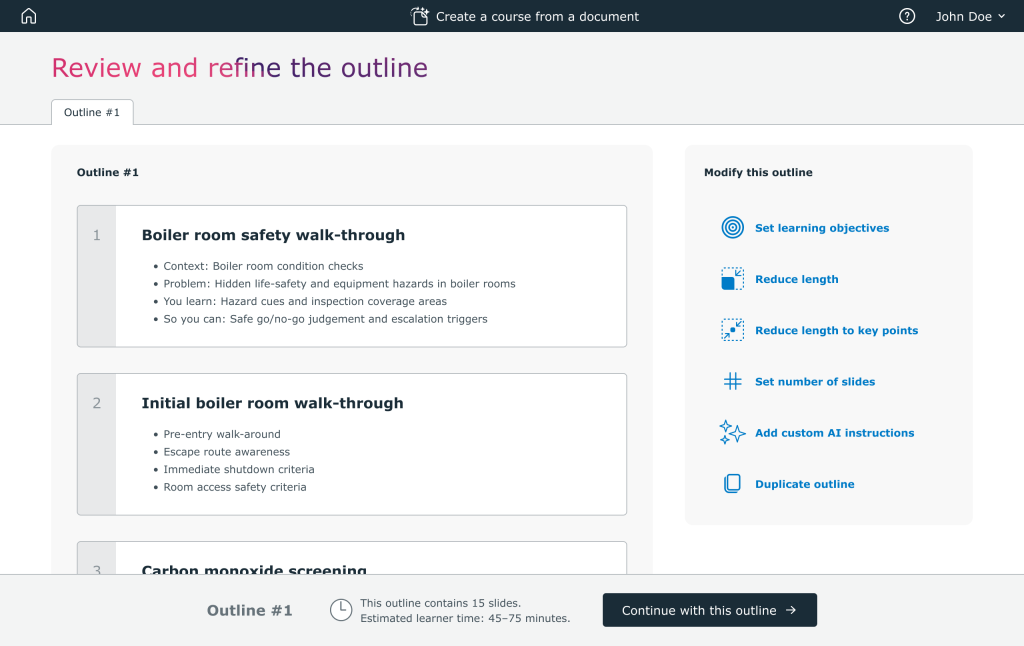
First, JollyDeck generates an editable course outline. Before generating the slides, you can check the proposed structure, adjust the length, remove unnecessary parts, and make sure the course follows your learning objectives.
You can refine the outline in two ways:
- Manual outline editing — adjust the course structure yourself before generating the final course.
- AI-assisted refinement — work with the built-in copilot to improve the outline based on your learning objectives, target audience, or preferred course length.
This keeps you in control of the conversion process. Instead of receiving a finished AI-generated course and fixing it afterwards, you can shape the course before the full conversion begins.
Control how the course is written
Different source documents need different treatment. Some materials need to stay close to the original wording. Others need to be rewritten into clearer, more learner-friendly course text.
The new JollyDeck Doc-to-Course converter gives you more control over how the generated course is written. You can adjust:
- Target audience — adapt the course to the people who will actually use it.
- Rewrite depth — decide whether the course should stay close to the source, be rewritten for clarity, or be transformed into a more guided learning experience.
- Teaching voice — choose whether the course should remain neutral and formal, or provide more guidance to the learner.
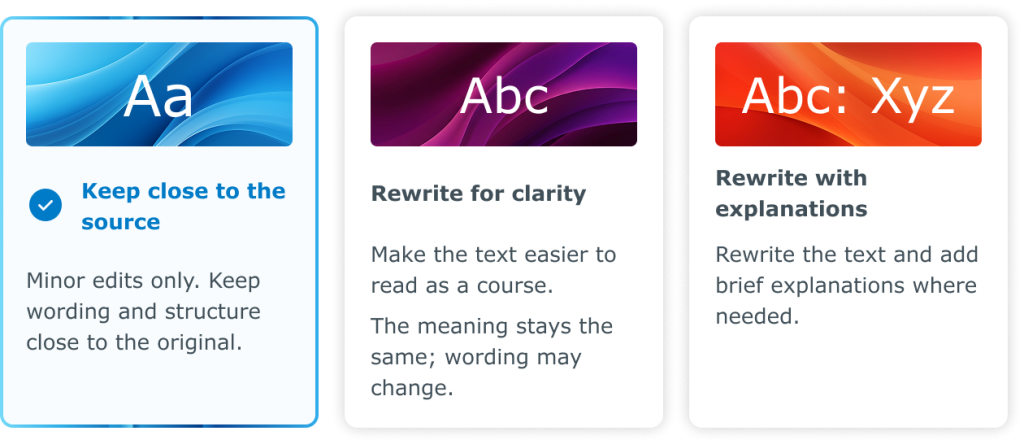
This helps you create courses that fit the purpose of the source material, instead of forcing every document into the same generic AI writing style.
Turn static content into active learning
Support for interactive questions has been fully refactored.
Instead of simply adding questions wherever they fit technically, JollyDeck now places them more carefully where they can support learning: after important concepts, key decisions, essential procedures, or content that learners need to remember and apply.
The new question workflow is also designed around evidence-based learning techniques, including retrieval practice and spaced reinforcement. Questions help learners recall important points, check understanding, and stay actively involved with the course content.
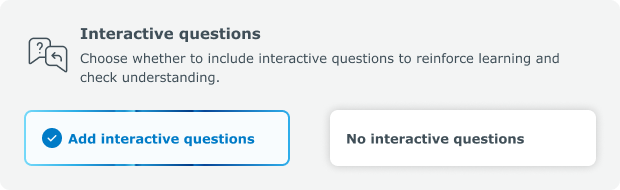
The quality of generated questions has also been improved. AI now follows better practices for writing questions, answers, and distractors, so questions are clearer, more relevant, and more closely connected to the actual course content.
Stay fully in control after conversion
The generated course is not a locked AI output, as it is in many similar solutions. After conversion, everything remains fully editable in JollyDeck Create.
You can review and adjust the text, structure, questions, images, layout, and final learning flow before publishing the course.
This gives you the speed of AI-assisted course creation without giving up control over the final result.
Simplified pricing
We have also significantly simplified the pricing model for Doc-to-Course conversion.
The price is now based on the number of generated slides, not on the size of the uploaded source document. This means that a long source file does not automatically cost more than a short one.
You pay for the course you decide to generate, not for the original document you upload or the AI actions used to modify the outline.
Try the new Doc-to-Course converter
The new converter is now available in JollyDeck. Upload your existing PDF, Word document, or PowerPoint file, review the outline, guide the AI, and generate a fully editable course.
Open JollyDeck and start turning your existing documents into structured learning experiences.