
For a long time, AI video had one obvious problem: it didn’t feel quite right.
Faces were slightly stiff. Voices could sound off. You noticed the presenter more than the message.
That problem is largely behind us.
What matters at this point is not whether an AI video looks realistic in isolation, but whether it helps people focus on the content without distraction. That threshold – comfort, not perfection – is what makes AI video usable for real learning, not just impressive in demos.
This update is about crossing that threshold.
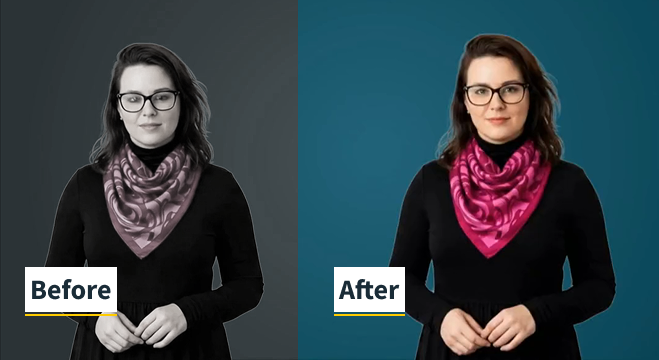
A visible leap in quality in just three months
The fastest way to understand what has changed is to compare what AI video looked like a few months ago with what the latest models can do today.
The progress isn’t subtle.
The difference isn’t about chasing hyper-realism. It’s about delivery that feels calmer, more natural, and easier to watch – the kind that stops competing with the message.
When avatars reach this level of naturalness, learners stop noticing the presenter and start paying attention to the idea being explained.
That’s the moment AI video shifts from novelty to something you can confidently use in real learning workflows.
What’s new
This update introduces a significant upgrade across avatars, voices and languages
- All the avatar’s movement is smoother and better timed.
- Facial expressions respond more naturally to speech.
- Many of the narrator voices are also updated for better pacing and voice control
- Deployed across all of the 19 languages fully supported across JollyDeck, enabling a consistent delivery across geographies
The goal wasn’t to add more assets for the sake of it. It was to remove friction – the small, easily noticeable cues that make a video feel awkward or fatiguing over time.
These improvements are additive. Existing content doesn’t break or become obsolete as the models improve. Instead, scripts, structure, and learning design compound in value as delivery quality increases.
Why comfort matters more than realism for e-learning
In learning, attention is fragile.
A slightly unnatural voice, odd facial movement, or inconsistent pacing doesn’t just feel “a bit off” – it actively competes with the content for cognitive attention. Learners become aware of the medium instead of absorbing the message.
But when delivery feels natural enough:
- Learners stay engaged for longer,
- Content feels clearer and more credible, and
- Completion rates improve because watching feels easier
This is especially important in workplace learning, where learning is consumed alongside real work, not in isolation.
Voice, tone, and meaning
The same script can feel reassuring, authoritative, or disengaging depending entirely on tone and pacing. That effect becomes even more pronounced when content is delivered at scale, across different languages and cultures.
Voice is more than sound. It’s a signal of intent.
The improved voices in this update give creators more control over how a message lands – not just what is said, but how it feels to listen to.
From AI video to learning infrastructure
Even 6 months ago, AI avatars were often impressive but slightly awkward.
This update moves AI video closer to something you can use routinely:
- faster updates when content changes
- consistent delivery across languages
- lower effort to maintain and scale learning materials
At this point, the limiting factor is no longer technology. It’s how intentionally it’s used.
AI video works best when it supports clarity, not when it tries to impress.
What creators should take away
If you’re building with AI video today, the question has changed.
It’s no longer “is this realistic enough?”
It’s “does this make it easier for someone to learn?”
This update is about making the answer to that question “yes”.
Where we’re taking this next
This update lays the groundwork. The platform and models are now at a point where AI video is genuinely usable.
What comes next is about application. We’ll focus on how to use AI video deliberately in JollyDeck – where it adds value, where it doesn’t, and how to get strong results quickly without overengineering.
Become an early adopter
Log in to JollyDeck and try the updated avatars in your next video. It’s free!